A missing run
If the machine, scheduler, worker, or job disappears, the expected CronRadar signal disappears with it.
Cron monitoring guide
Your job checks in when it runs. CronRadar watches the schedule and tells you when a run fails, takes too long, or never arrives. Start with one job and verify its next scheduled run.
Runnable setup
Create an application and store its key as CRONRADAR_API_KEY in the job's environment. Save this wrapper as a script and replace the backup command. This example expects a daily run at 02:00 UTC; match the real job's schedule and timezone in your monitor settings.
#!/usr/bin/env bash
# The backup keeps its own exit status if a check-in fails.
base="https://cron.life/api/v1/ping/nightly-backup"
run_id="$(date -u +%Y%m%dT%H%M%S)-$$-$RANDOM"

report() {
  if [ -z "$CRONRADAR_API_KEY" ]; then
    printf '%s\n' 'CronRadar key missing; backup will still run.' >&2
    return 0
  fi
  curl --silent --show-error --fail --max-time 5 \
    --request POST --user "$CRONRADAR_API_KEY:" \
    --get "$base/$1" \
    --data-urlencode 'schedule=0 2 * * *' \
    --data-urlencode 'gracePeriod=300' \
    --data-urlencode "run_id=$run_id" \
    --output /dev/null || \
    printf '%s\n' 'CronRadar check-in failed; inspect monitoring setup.' >&2
}

report start
/opt/app/backup.sh
job_status=$?
if [ "$job_status" -eq 0 ]; then
  report complete
else
  report fail
fi
exit "$job_status"
Each report can wait up to five seconds. A failed report does not stop the backup or replace its exit status. The first accepted report registers the job; create the monitor in advance if you need missed-run coverage before that first execution.
Follow the setup guide to connect it, or give your assistant the agent quickstart.
What you can track
If the machine, scheduler, worker, or job disappears, the expected CronRadar signal disappears with it.
CronRadar evaluates the next expected run against a bounded grace period instead of treating every job like a fixed uptime probe.
Send start, complete, fail, and a bounded failure message. Keep detailed logs in the system built for them.
Group recurring work by application while framework extensions keep declared schedules synchronized.
Route incidents to email, Slack, webhook, Discord, or PagerDuty on every plan.
Official SDKs cap HTTP requests at five seconds and catch monitoring failures so the job keeps its original behavior.
Real interface
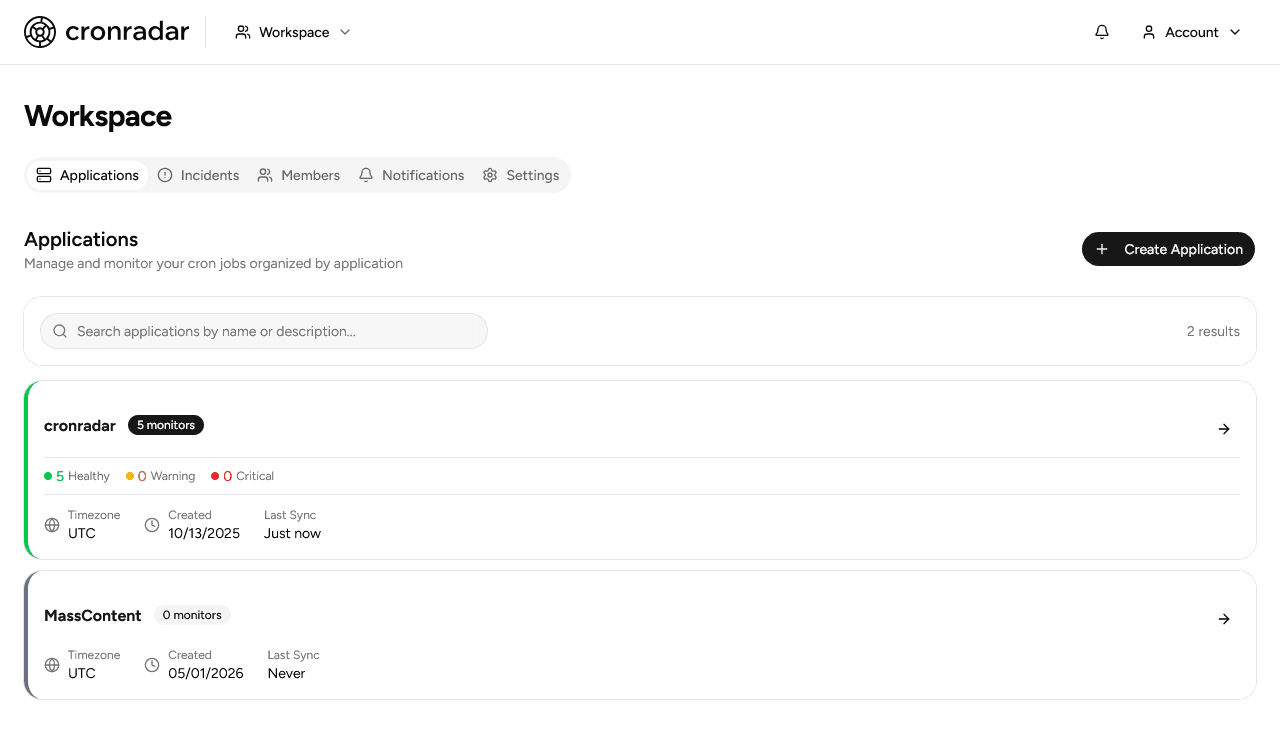
Verify your setup
Choose a job whose output you can safely inspect. Use an available framework integration or the shell wrapper above.
Confirm a real completion and its output. Send a test notification, then use a dedicated test job to verify failure or missed-run behavior.
Confirm the next scheduled execution arrives. Keep existing monitoring active until the schedule and alert destination are verified.
Questions
No. CronRadar receives signals from scheduled work; it does not probe websites or publish status pages.
No. Store diagnostic detail in your logging platform. CronRadar keeps execution events and an optional bounded failure message.
Yes. Define a bounded expectation such as records_processed >= 1, then report that numeric result with the completion event. Missing or failing checks create an explained outcome incident.
Choose your framework in the setup guide and check its current package availability. Direct HTTP reporting works when an SDK is not available.
See the complete workflow on the product overview.
Free protects ten active automations with unlimited collaborators and every supported alert channel. Development and staging jobs count toward the same limit.